一定要使用稳定版本的springboot项目,否则报一些不知道原因的错误
    <parent>
        <groupId>org.springframework.boot</groupId>
        <artifactId>spring-boot-starter-parent</artifactId>
        <version>1.5.7.RELEASE</version>
        <relativePath/> <!-- lookup parent from repository -->
    </parent>
建议以后使用spring-boot项目,用maven新建项目,然后用以下配置
<packaging>jar</packaging>

    <name>spring-boot-demo</name>
    <description>Demo project for Spring Boot</description>

  <parent>
        <groupId>org.springframework.boot</groupId>
        <artifactId>spring-boot-starter-parent</artifactId>
        <version>1.5.9.RELEASE</version>
        <relativePath/>
    </parent>

    <properties>
        <project.build.sourceEncoding>UTF-8</project.build.sourceEncoding>
        <project.reporting.outputEncoding>UTF-8</project.reporting.outputEncoding>
        <java.version>1.8</java.version>
    </properties>

    <dependencies>
        <dependency>
            <groupId>org.springframework.boot</groupId>
            <artifactId>spring-boot-starter-web</artifactId>
        </dependency>

        <dependency>
            <groupId>org.springframework.boot</groupId>
            <artifactId>spring-boot-starter-test</artifactId>
            <scope>test</scope>
        </dependency>
    </dependencies>

    <build>
        <plugins>
            <plugin>
                <groupId>org.springframework.boot</groupId>
                <artifactId>spring-boot-maven-plugin</artifactId>
            </plugin>
        </plugins>
    </build>
注意事项:
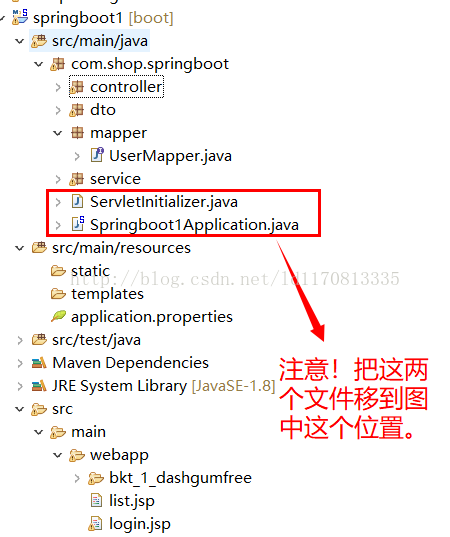
1. controller方法无法加载
一定要将application项目放在合适的位置;controller无法被扫描到,从而导致无法访问到你的方法
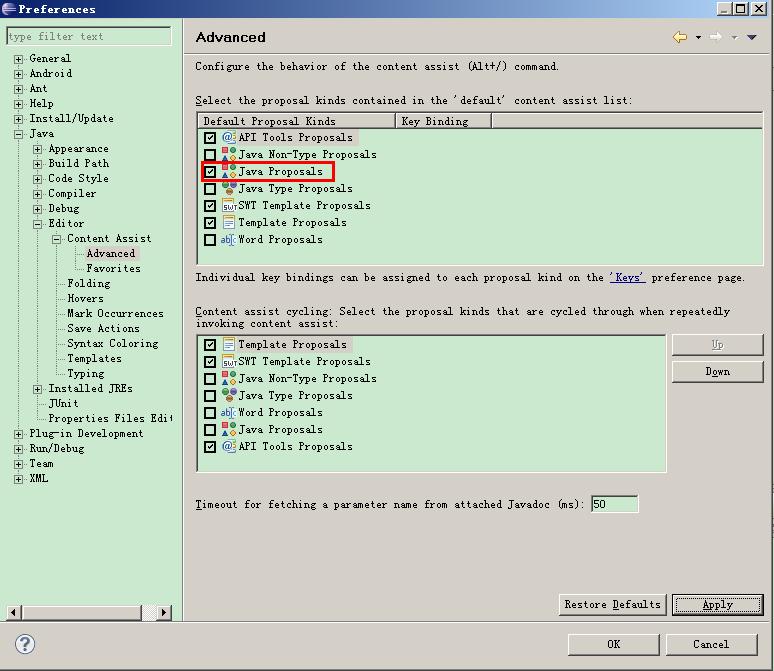
2. 代码不能提示:
Eclipse中window->Preferences->Java->Editor->Content Assist->Advanced->顶部的选项卡Select the proposal kinds contained in the 'default' content assist list: 中把”Java Proposals“ 选项打上勾。
包扫描 spring boot里,扫描的class对象是用注解@ComponentScan(未指定的情况下默认是main函数所在package)来指定的
@SpringBootApplication 相当于 @Configuration、@EnableAutoConfiguration 、 @ComponentScan 三个的作用